
How to Build a Fuel Price Monitoring App Using a Reliable Oil Price API in 2026
By
Ejaz Ahmed17 Mar 2026 • 8 min read

Imagine you are dealing with a group of delivery trucks. The fuel prices suddenly increased by 15 per cent overnight. Due to this, fuel costs can wipe out your profit margins before you even realize.
This is one of the main challenges of logistics companies and independent traders. Most individuals respond too late due to a lack of timely information. Such a delay can have a direct effect on operational decisions and long-term planning.
In this guide, I will demonstrate to you how to resolve this issue. First, we shall discuss the way to incorporate an oil price API into a custom monitoring application. Next, you are going to know how to retrieve real-time data and trace historical trends. We will also examine the easy methods of visualizing market events.
Let's get started!
Step-By-Step Guide to Integrating the Oil Price API
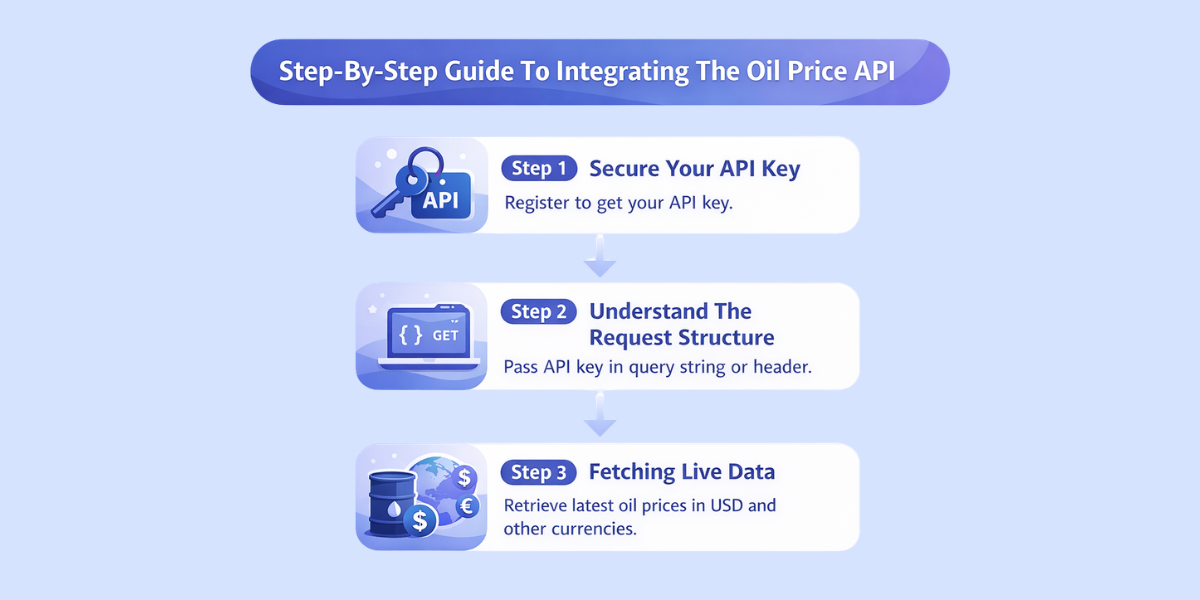
It is easy to develop your monitoring app. Therefore, here are the steps to get your first data point.
Step 1: Secure Your API Key
The first thing to do is to register at CommodityPriceAPI to receive your API key. Rate limiting is also used to prevent over use of API data and ensure fair access to the API.
Moreover, it makes the provider protect their servers and enables you to track your usage. It’s vital to respect API rate limits by understanding the plan’s limits and using batch requests to optimize calls.
API requests limit can be tracked via commodity prices API dashboard.
Step 2: Understand the Request Structure
Your app will send a GET request to the oil price REST API. If the API supports batch queries, you can pull multiple data points in one call and reduce network load.
Besides, it is better to pass the API key through a query parameter or a request header as a more secure way. For security, all requests require an API key in the Authorization header.
Step 3: Fetching Live Data
You will be hitting the /latest endpoint to obtain the latest prices. Then, you will be able to define the barrel price in USD or in any of the 175+ supported currencies. HTTP status codes should be verified before parsing JSON responses to confirm successful requests.
Practical Code Example: Python Fuel Tracker
The following is a Python script that can be used to fetch crude oil price API. we will use requests library to communicate with our API end points.
import requests

def get_fuel_prices():
    print("\nFetching latest oil prices...\n")

    # Your API Key
    api_key = "add-your-api-key-here"

    # API Endpoint
    base_url = "https://api.commoditypriceapi.com/v2/rates/latest"

    # Parameters
    params = {
        "apiKey": api_key,
        "symbols": "WTIOIL-FUT,BRENTOIL-FUT",
        "quote": "USD"
    }

    try:
        response = requests.get(base_url, params=params)

        # Check HTTP status
        if response.status_code != 200:
            print("HTTP Error:", response.status_code)
            print(response.text)
            return

        data = response.json()

        # Debug: show raw API response (optional)
        # print(data)

        if data.get("success"):

            rates = data.get("rates", {})

            wti_price = rates.get("WTIOIL-FUT")
            brent_price = rates.get("BRENTOIL-FUT")

            print("----- Live Oil Prices -----")

            if wti_price:
                print(f"WTI Crude Oil : ${wti_price} per Barrel")

            if brent_price:
                print(f"Brent Crude Oil : ${brent_price} per Barrel")

            print("----------------------------")

        else:
            print("API returned an error:")
            print(data)

    except requests.exceptions.RequestException as e:
        print("Network error occurred:", e)

    except Exception as e:
        print("Unexpected error:", e)


# Run the script
if __name__ == "__main__":
    print("Starting Fuel Price Monitoring App...")
    get_fuel_prices()
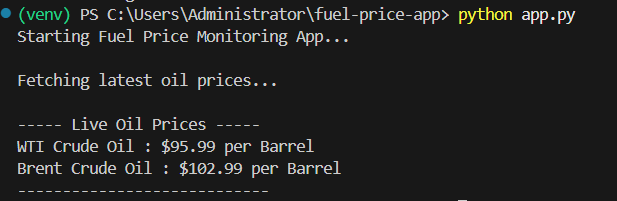
Here's the output
Explanation of the Code
- Symbols: These are WTIOIL-FUT and BRENTOIL-FUT. Thus, they are the standard codes of crude oil price API.
- Success Check: When we are processing data, we always look at the success Boolean. As a result, we prevent errors.
- Unit: The unit of the oil price API report informs us that the unit is per barrel.
Helpful Resource: Integrate Commodity Prices API into Your App in Minutes
Advanced Features: Analyzing Market Trends
In addition to the live prices, your app can also display the historical changes. For example, you can use the historical endpoint to see how prices looked in October last year.
Historical Data and Time Series
The /timeseries endpoint will allow you to retrieve data for a certain month or year. Hence, it is essential for businesses that require developing an oil price API report for stakeholders.
- Select Date Range: To start with, choose a startDate and an endDate.
- Request Data: This is followed by a list of prices for each day in that range returned by the API. Caching responses locally reduces redundant calls to the API and optimizes data handling efficiency.
- Analyze: Lastly, examine correlations between price spikes and market events.
Security Best Practices for Developers
You need to secure your credentials when you improve your app. Commodities prices API protects data with strong encryption, authentication, and access controls. You should always avoid hard-coding your API key in a client side code, such as JavaScript. Otherwise, this will enable users to steal your quota.
Rather, employ environmental variables. Good oil price API integration also means managing API keys securely, using caching, and monitoring for service outages. Monitoring and logging tools such as Datadog or New Relic can help track API usage and identify performance issues.
Moreover, never call the oil price API directly, but use a secure backend server. Oil price APIs also use bank-grade SSL encryption to protect data during transmission. Consequently, your trading is confidential, and your access is private. Some APIs also use IP whitelisting so only approved IP addresses can access the data.
Monitoring Global Energy Commodities
Although oil is the king, a versatile oil price API can also include other energy sources. It also gives you real-time global data every 5 minutes for crude oil, natural gas, and refined products. Hence, to obtain a complete picture of the commodities market, you can follow natural gas (NG-FUT) or coal.
The EIA usually presents raw information. But with an oil price API such as CommodityPriceAPI, it becomes easier. Consequently, it converts the oil prices API report into a single, easy-to-read series. This will save you the time spent searching government spreadsheets.
Why Do You Need an Oil API for Building Fuel Price Monitoring App?
An oil price API is a specialized oil price REST API. The API provides real-time data on crude oil prices, market trends, and analysis for developers and businesses. It enables developers to access live and historical data for their applications. It is an intermediary between huge financial transactions and your software.
Your app is automatically updated in a structured JSON format instead of manually searching the news sites. It returns data in JSON format and keeps average response times around 180 ms.
Why should you care? Since precision is all in trading and production planning. Real-time pricing updates ensure that development efforts are based on accurate and up-to-date data. Otherwise, using outdated data can cause massive financial losses.
Moreover, you can monitor crude oil, Brent crude, natural gas, or coal under one source. Commodities-API allows developers to compare crude oil prices across various marketplaces, periods, and grades.
Helpful Resource: Why Every Business Needs Live Commodity Data Now
Key Benefits for Businesses
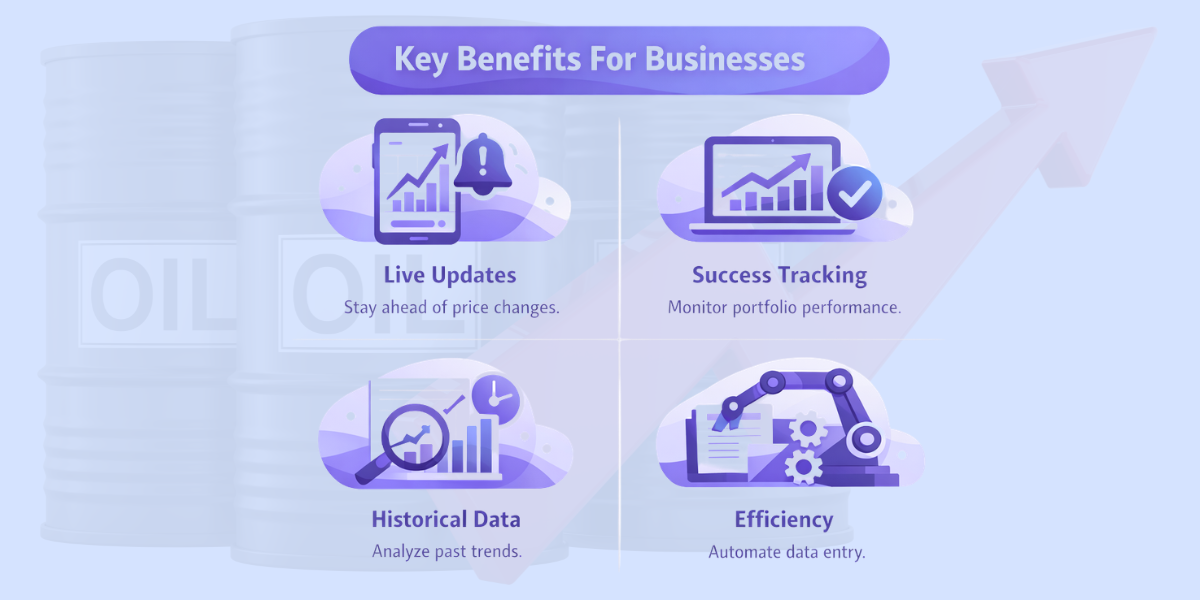
- Live updates: Be ahead of unexpected price changes. OilPriceAPI delivers prices that are refreshed every 1–2 minutes, providing the latest market trends.
- Success tracking: In addition, keep track of the performance of your portfolio compared to live rates.
- Access to historical data: This leads to trend interpretation over the past years in order to determine future moves.
- Efficiency: End up saving millions in manual work as a result of automating data entry.
Choosing the Right Provider: Why CommodityPriceApi?
In search of the best oil price API, you must look into one provider that gives accuracy and is easy to use. Commodity Prices API gives you real-time and historical WTI and Brent crude prices with 99.9% uptime and sub-second response times.
Thus, CommodityPriceAPI is the best option among developers. It trades more than 130 commodities, which include WTI crude and Brent crude. They provide a free oil price API tier that is ideal for testing. The free trial tier at OilPriceAPI.com includes up to 10,000 requests.
Moreover, you do not even need a credit card to begin. To access their API key, users need to create an account and get an API key, and the trial does not require a credit card. The documentation is well-structured and has a responsive support team.
The API also includes detailed documentation, SDKs, and support to make integration easier.
Consequently, their console simplifies the way in which you can handle your requests. The API also supports custom data feeds for specific needs, such as different crude oil grades or regional price differences. Regardless of whether you require monthly reports or weekly data.
Helpful Resource: Time-Series Analysis of Oil and Gold Prices Using a Real Time Commodity Prices API
TL;DR
- What: An oil price API is a programmatic access to energy market data.
- Why: It makes it accurate, time-saving, and drives more powerful financial analysis insights.
- How: Register a free API key, call the /latest or the /historical endpoint, and then manipulate the JSON.
- Which: CommodityPriceAPI is a trusted source of crude oil price API requirements.
Conclusion
The development of a fuel price monitoring app is a smart move in today’s volatile economy. With a powerful oil price API, you will put yourself in a position to get real-time updates and even stay informed through an oil price news API.
Besides, it also provides you with deep historical data. Commodity prices API updates prices every 5 minutes during market hours and gives access to up to 2 years of historical data. You have already observed how simple it is to incorporate this price data with a simple REST API structure.
The correct API is a foundation, whether you are creating a trading tool internally or designing a tool to serve millions of users. The Oil Price Data API helps developers build powerful apps with reliable oil price data.
Thus, begin with a free oil price API plan and increase it with your requests.
FAQs
Is There an Oil Price API Free for Developers?
Yes, CommodityPriceAPI has a free oil price API tier. It has a small quota of requests and historical data access to enable you to get started at no cost.
How Often Is the Live Oil Price API Data Updated?
Premium users have the live oil price API data updated hourly at a rate of 60 times a day. This makes you get the most current rates.
Can I Get Oil Prices in Currencies Other Than USD?
Absolutely. The oil price API can be translated to more than 175 currencies. All you need to do is pass the quote parameter in your API call.
What Symbols Should I Use for Crude Oil?
In the case of the API crude oil price, you generally use WTIOIL-FUT when dealing with West Texas Intermediate or BRENTOIL-FUT when dealing with Brent Crude.
Can I Integrate an Oil Price API With Mobile or Web Apps?
Yes, an oil price API could be used in mobile and web applications through the use of REST and JSON. The API is suitable for building applications that track commodity trends and integrate with tools like Python and Excel. It supports such platforms as Android, iOS, React, Python, and Node.js.
How Accurate Is the Data From an Oil Price API?
Reputable global exchanges and institutions collect the data used in an oil price API. Thus, it gives the correct and often updated prices to make decisions in real-time.